
The Privacy Paradox in Meeting Intelligence
Discover how Foundra's platform enables real-time meeting capturing, transcription and summarization directly on your devices (PC, laptop, mobile phones, on-premise devices) — eliminating the privacy risks of cloud-based recorders.
The "Listening" Problem
Meetings are the operating system of business. Yet, capturing the value from these conversations—decisions, action items, insights—has traditionally required a dangerous trade-off: Privacy vs. Intelligence.
Cloud-based "meeting bots" that join your calls offer convenience, but they introduce massive surface area for data leaks:
- Sensitive IP: Product roadmaps and financial projections are uploaded to third-party servers.
- Legal Risk: Client confidentiality agreements may prohibit external recording processing.
- Latency: Cloud round-trips cause lag in real-time translation or captioning.
Enterprises need intelligence that respects the perimeter.
Foundra: The Private Co-Pilot
Foundra empowers organizations to build on-device meeting assistants. By running powerful speech-to-text and LLMs locally on devices like MacBooks, iPads, and Windows PCs, we deliver cloud-grade performance with zero data egress.
From User Prompt to Local Meeting Assistant
A typical journey starts from a simple requirement, such as:
“I want to build a meeting assistant running on a local MacBook, which is able to convert audio to text in real time, and after the meeting, the assistant should generate a meeting summary.”
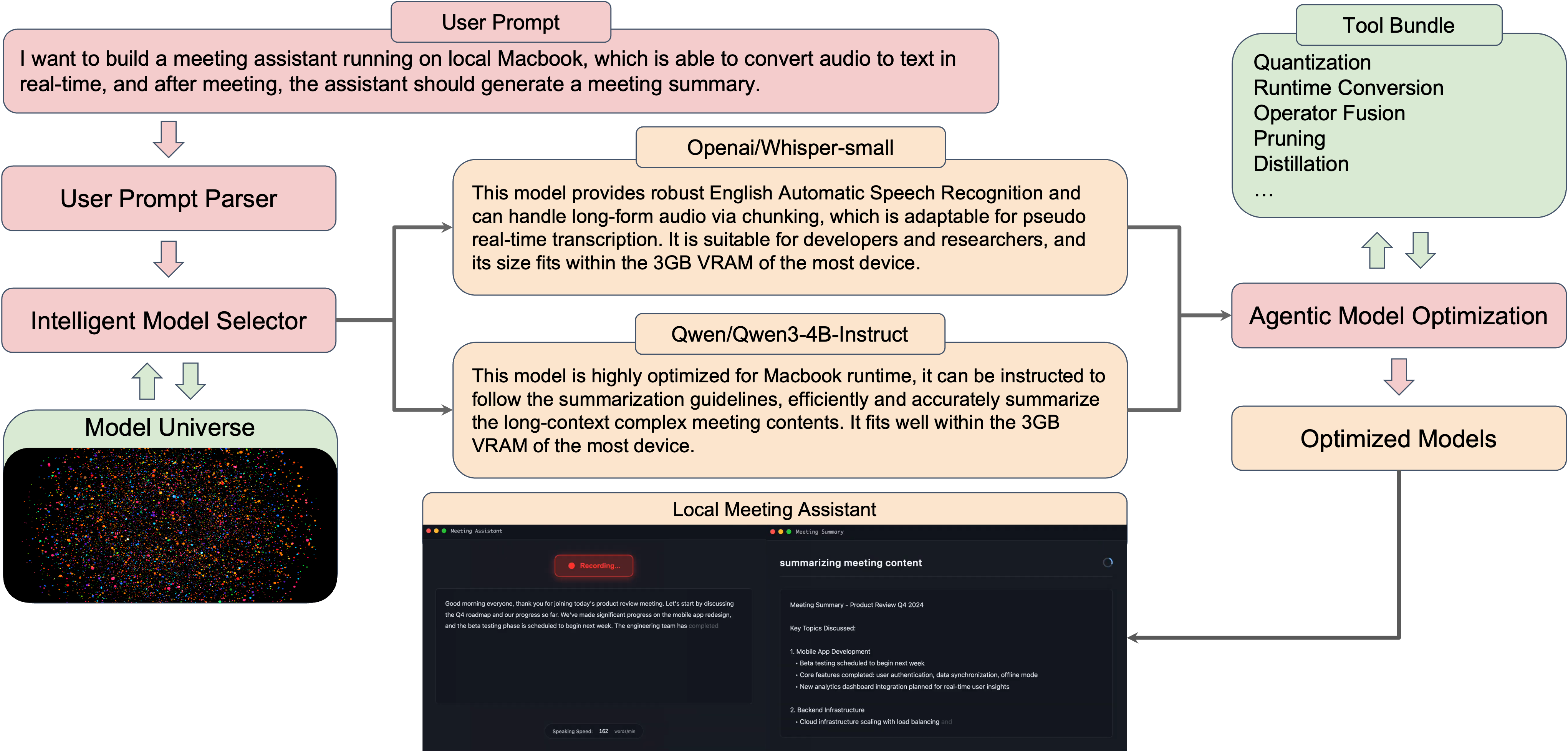
Our platform turns this high-level intent into a concrete, optimized on-device workflow:
-
User Prompt Parser
The natural-language requirement is parsed into structured constraints: device type (e.g., MacBook), memory budget (≈3 GB VRAM), latency target (real-time / near real-time), and output needs (transcript + summary). -
Intelligent Model Selector + Model Universe
The parser talks to an internal Model Universe—a catalog of ASR and LLM models. An Intelligent Model Selector searches this universe to find the best combination that satisfies the constraints:- OpenAI/Whisper-small for speech recognition
- Robust English ASR that supports long-form audio via chunking.
- Well-suited for pseudo real-time transcription on commodity laptops.
- Fits comfortably within a ~3 GB VRAM budget.
- Qwen/Qwen3-4B-Instruct for summarization
- Highly optimized for MacBook-class devices.
- Can be instructed with custom summarization guidelines.
- Handles long-context, complex meeting content while staying within the same VRAM envelope.
- OpenAI/Whisper-small for speech recognition
-
Agentic Model Optimization + Tool Bundle
Once models are selected, an agentic optimizer assembles optimization methods from an appropriate tool bundle to meet the hardware and latency goals:- Quantization
- Runtime conversion (e.g., to CoreML / ONNX / TensorRT-compatible backends)
- Operator fusion
- Pruning
- Distillation
- Other compression techniques
The agent automatically explores these options, producing optimized model artifacts tailored to the user’s exact device.
-
Aide: The On-Device Meeting Assistant
The resulting optimized Whisper and Qwen models are packaged into a local meeting assistant app:- A recording view for real-time transcription.
- A summary view that follows internal guidelines (key topics, action items, next steps).
- Everything runs locally, so audio and text never leave the device.
This pipeline is what powers Aide: a MacBook app that records, transcribes, and summarizes meetings in real time—entirely offline if needed.
How We Compare to Existing Meeting Assistants
Most meeting assistants still rely heavily on the cloud, external bots, or manual integration work. Foundra takes a different approach: local-first, fully controllable, and automation-driven.
The table below summarizes how Aide compares to popular tools:
| Capability | Ours (Aide) | Meetily | Zoom AI | Fireflies | Pluely / Cluely / Speakr |
|---|---|---|---|---|---|
| Real-time latency | ✅ 1~2s | ✅ 1~2s | ✅ 1~2s | ✅ 1~2s | ✅ 1~2s |
| 20min transcript speed | ✅ < 30s | ⚠️ > 1min | ✅ < 30s | ✅ < 30s | ✅ < 30s |
| 20min summary speed | ✅ < 20s | ⚠️ > 3min | ✅ < 20s | ✅ < 20s | ✅ < 20s |
| No Meeting Bots | ✅ | ✅ | ✅ | ❌ | ✅ |
| Data Processing | ✅ Fully local | ✅ Fully local | ❌ Cloud | ❌ Cloud | ❌ Cloud |
| Privacy | ✅ Full control | ✅ Full control | ⚠️ Unsure | ⚠️ Unsure | ⚠️ Unsure |
| Fully offline | ✅ | ✅ | ❌ | ❌ | ❌ |
| Dev cost | ✅ Minutes | ❌ Months | ❌ Months | ❌ Months | ❌ Months |
| Local summarizer | ✅ SOTA LLM | ⚠️ Ollama | ❌ Cloud | ❌ Cloud | ❌ Cloud |
| Whisper/Parakeet | ✅ | ✅ | ⚠️ Unknown | ⚠️ Unknown | ⚠️ Unknown |
Bottom line: Foundra gives you the speed and intelligence of leading meeting tools, while staying fully local, privacy-preserving, and dramatically cheaper to build and maintain.
The End-to-End Workflow
1. SELECT: Specialized Speech Models
Generic speech models struggle with technical jargon. Foundra selects models pre-trained on domain-specific corpora.
- Medical: Accurate transcription of drug names and diagnoses.
- Legal: Precise capture of case citations and terminology.
- Engineering: Correct formatting of code snippets and technical acronyms.
2. OPTIMIZE: Laptop-Scale Intelligence
Running a 7B parameter model alongside Zoom or Teams requires extreme efficiency. Foundra optimizes models to run in the background without draining battery or stalling video calls.
- Quantization: Compress models to 4-bit integers with minimal accuracy loss.
- NPU Acceleration: Offload inference to the Neural Engine (Apple) or NPU (Intel/AMD/Qualcomm) to keep the CPU free for the video call.
On-Device Optimization Benchmarks
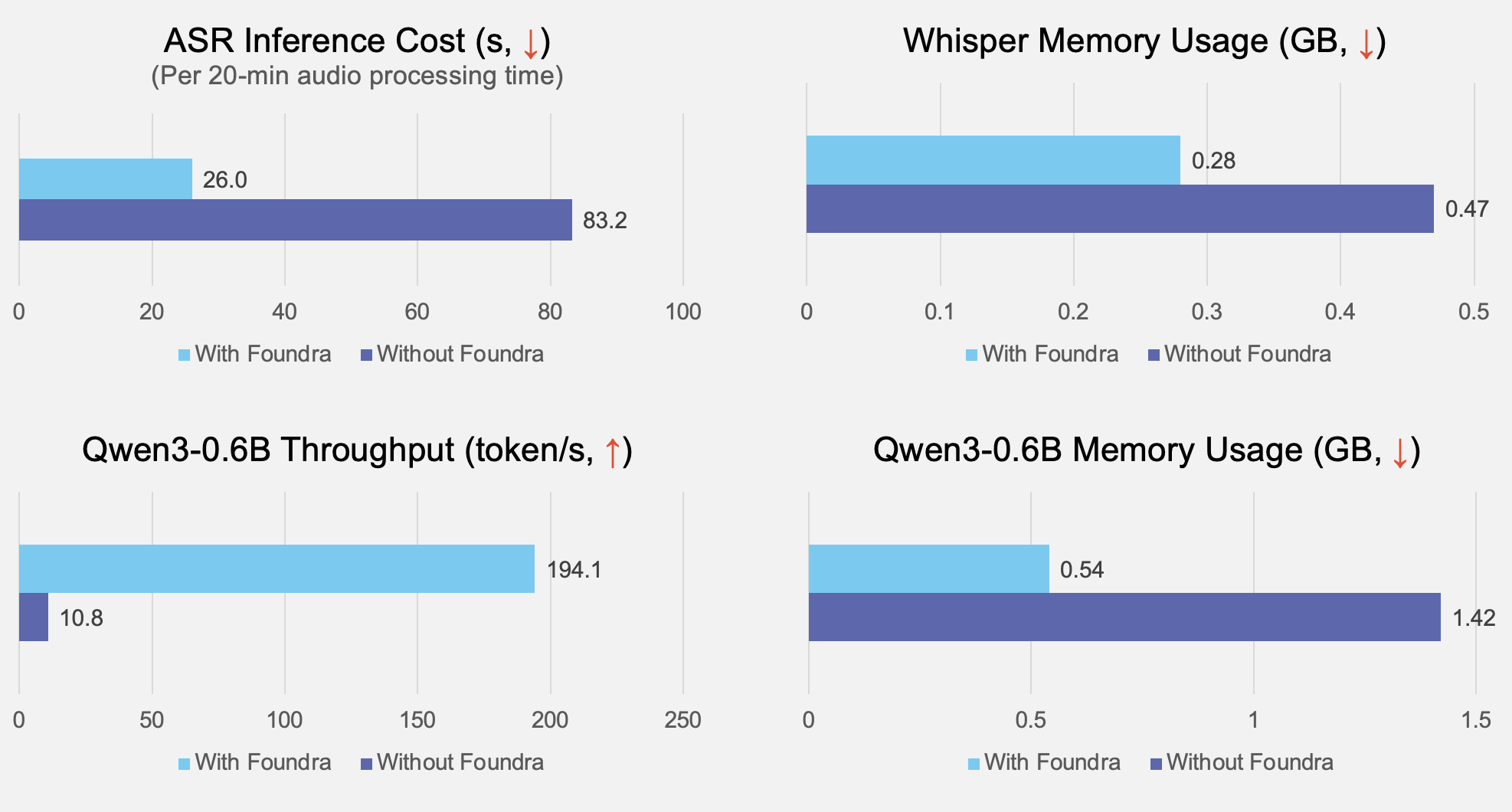
On a standard laptop-class device, our optimization pipeline delivers:
- 3.2× faster Whisper ASR inference (83.2s → 26.0s for 20-min audio).
- 41% lower Whisper memory usage (0.47 GB → 0.28 GB).
- 18× higher Qwen3-0.6B throughput (10.8 → 194.1 tokens/s).
- 61% lower Qwen3-0.6B memory usage (1.42 GB → 0.54 GB).
These gains translate directly into smoother meetings: less lag, longer battery life, and room to run additional workloads on the same device.
3. DEPLOY: The Invisible App
Deploy Aide as a lightweight background application or a browser extension.
- System Audio Capture: Securely hook into system audio streams without virtual drivers.
- Offline Mode: Full functionality even on airplanes or in secure facilities without internet.
Enterprise Use Cases
Financial Services
Challenge: Documenting client advisory calls while adhering to strict GDPR/SEC data residency rules.
Solution: Aide drafts compliance notes and summary emails instantly after the call, with no audio ever leaving the advisor's laptop.
Healthcare Providers
Challenge: Reducing documentation burnout for doctors during patient consultations.
Solution: A tablet-based scribe listens to the consult and auto-fills the EHR fields. Because it runs offline, it works reliably in hospital wings with poor Wi-Fi and maintains HIPAA compliance by design.
Global Engineering Teams
Challenge: Bridging language barriers in real-time technical reviews.
Solution: Real-time, low-latency translation of technical Japanese to English, running locally to prevent latency lag from disrupting the flow of conversation.
Why On-Device Matters
- 100% Data Sovereignty: Audio never touches a server you don't own.
- Zero Latency: Instant transcriptions and translations.
- Cost Savings: Eliminate API fees for transcription services and reduce recurring SaaS spend.
Conclusion
Your meetings are your business's most valuable dataset. Don't give it away. Foundra enables you to harness that value securely, turning every employee's device into a powerful, private intelligence engine.